
“Where is my container?” reaches the public website first, from people who will never have an account. Most sites answer with a phone number, or with a search box that says “not found” when it simply could not ask.
The problem: the question is public, the data is not
The people who ask are rarely your users: a consignee, a trucker, a customs broker. They want one status, once, without a login. So the question lands in a mailbox, and someone copies a status into an email.
Putting a search box on the public site sounds like an afternoon. It goes wrong in three places:
- The key ends up in the browser. A widget that calls the tracking API from JavaScript ships its credential to every visitor.
- The page lies when the source is down. A timeout rendered as “container not found” sends a truck for nothing, or makes someone call to complain about a box that is fine.
- Typos reach the source. One wrong letter costs a remote call.
What we built
A WordPress plugin, `dmsct` (Container Tracking), written as a thin wrapper around a small core with no CMS in it. The same core is specified for Joomla and Drupal wrappers; only the WordPress one is built today.
Three rules shaped it:
It works at activation, before any API. The default source is a set of fictitious demonstration containers that say they are fictitious on the page. You see every screen before anyone talks about data access.
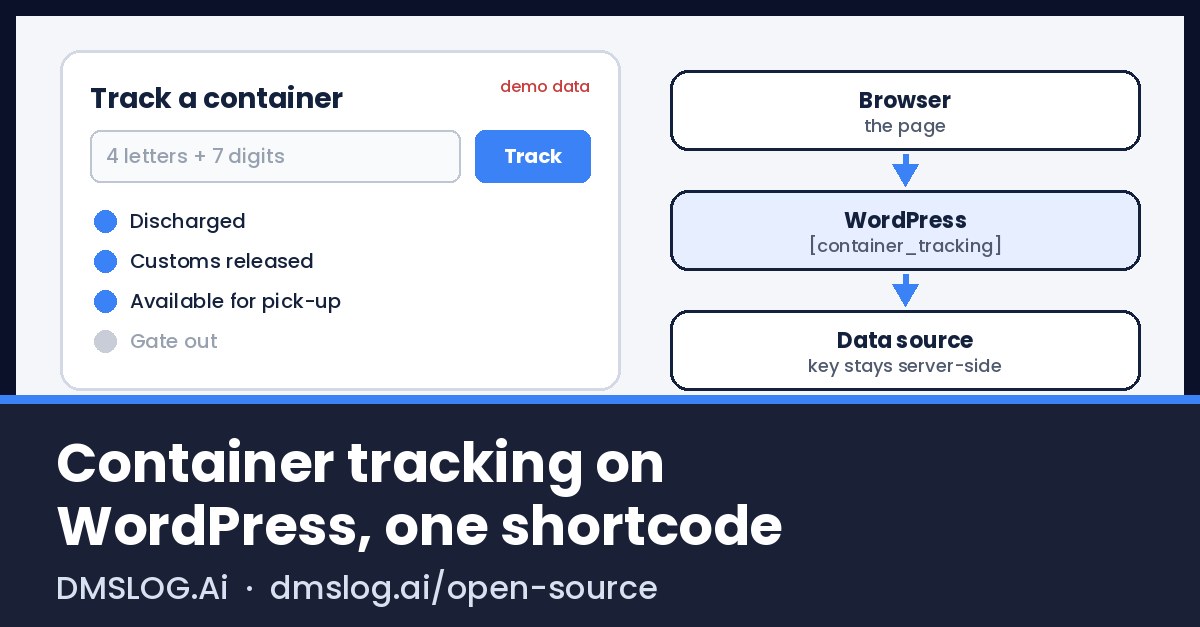
The credential never reaches the browser. The visitor’s form is a plain GET to your own page. WordPress, on the server, calls the terminal’s tracking service with the credential. The credential can live in `wp-config.php` rather than the database, and the settings page never prints it back. The source URL must be https and public; private hosts are refused unless declared.
“We could not ask” is not “not found”. Each outcome has its own screen: ready for pickup, not ready with each hold and its reason, unknown number, source unreachable, too many searches, wrong check digit. Data the terminal did not give stays absent: no placeholder, no guess.
The plugin never talks to a terminal operating system directly, only to a read-only tracking service.
An example
On a bare WordPress with WP-CLI, from the plugin’s distribution zip:
wp plugin install <package>.zip --activate   # the zip ships with the first release
wp post create --post_type=page --post_status=publish \
  --post_title='Track a container' \
  --post_content='[dmsct_tracking heading="Where is my container?"]'
The page now answers on demonstration data. A “Container search” block renders the same output. The form works without JavaScript, and a result can be bookmarked.
To serve real answers, go to Settings › Container tracking, choose “A tracking facade”, enter its https URL, then press “Ask the source now”. Keep the secret out of the database:
// wp-config.php
define( 'DMSCT_SOURCE_CREDENTIAL', '...' );
Two hooks cover most needs: the filter `dmsct_tracking_source` plugs any PHP source, and `dmsct_view_model` changes what is displayed. An optional REST endpoint, `/wp-json/dmsct/v0/tracking/{container_number}`, is off by default and rate limited when on.
Reject bad numbers before asking anyone
A container number carries its own check digit (ISO 6346). Checking it locally removes typos before any remote call. This function is complete; copy it into any PHP project:
function iso6346_is_valid(string $number): bool {
    $n = strtoupper(preg_replace('/\s+/', '', $number));
    if (!preg_match('/^[A-Z]{3}[UJZ][0-9]{7}$/', $n)) {
        return false;
    }
    $sum = 0;
    for ($i = 0; $i < 10; $i++) {
        $c = $n[$i];
        if (ctype_digit($c)) {
            $v = (int) $c;
        } else {
            $v = ord($c) - 55;          // A=10 ... Z=35
            $v += intdiv($v - 1, 10);   // skip 11, 22, 33
        }
        $sum += $v * (2 ** $i);
    }
    return ($sum % 11) % 10 === (int) $n[10];
}
`iso6346_is_valid(‘CSQU3054383’)` is `true`; change the last digit, `false`.
What works, what does not yet
- Works on our test bench: shortcode, block, settings page, demonstration data, the tracking facade source, the REST endpoint, the distinct error screens, coding standards and unit tests green.
- Not built yet: booking search and pasted lists in the form, clickable demonstration numbers under the field, French and Spanish translations.
- Not public yet: the package and the WordPress.org listing.
- Stays out of the plugin: payment, release orders, appointments, signatures.
What you can do tomorrow
- Count the “where is my container?” messages that reach your public contact address in one week.
- Open your current tracking widget in the browser’s network tab. If you can read a key there, rotate it and move the call to the server.
- Stop the source on a test site and search. If the page says “not found”, fix that before anything else.
- Paste the ISO 6346 function above in front of your lookup.
DMS Logistics has built software for logistics since 2020, used by 10,000 logistics customers in 28 countries. The plugin is free; wiring a terminal’s operations, customs and billing behind it is what we do as a service. If you look after a terminal’s or depot’s WordPress site and want to test the plugin before release, write to us from the open source page.